
10分钟用python实现手势识别
2020-07-28 22:08:12 来源:易采站长站 作者:
python实现手势识别环境准备①百度获取SDK②所需的库流程步骤①开启摄像头功能②手势识别③语音播报成果展示源码效果视频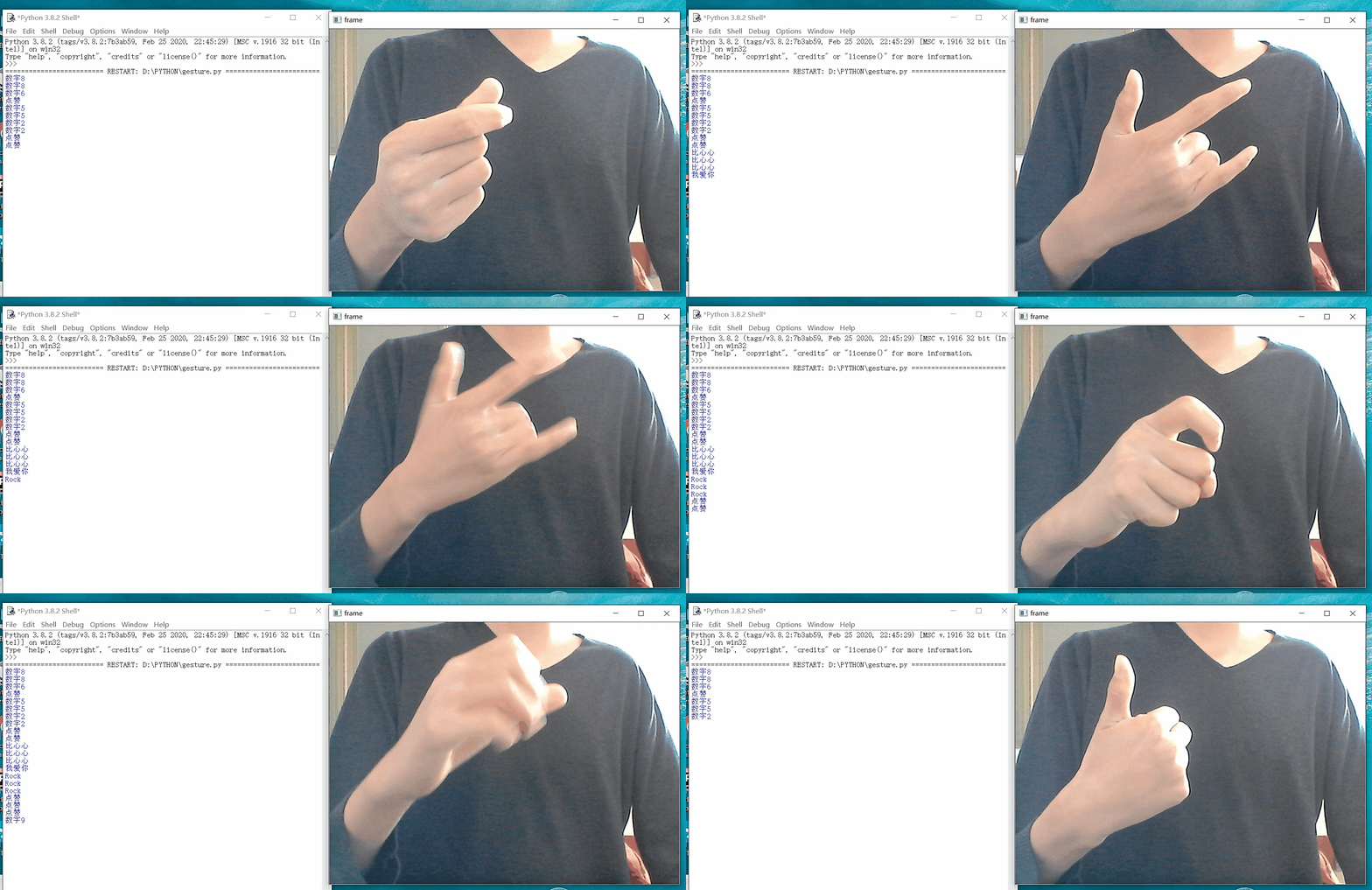
环境准备
①百度获取SDK
浏览器搜索百度云,如未注册请先注册,然后登录点击管理控制台。点击左侧产品服务→人工智能→人体分析。点击创建应用,输入应用名称如“Baidu_OCR”,选择用途如“学习办公”,最后进行简单应用描述,即可点击“立即创建”。会出现应用列表,包括AppID、API Key、Secret Key等信息,这些稍后会用到。
点进去之后,勾选所需要的api
②所需的库
程序整体是由python实现的,环境所包含的第三方库有cv2,threading,time,playsound,baidu-aip。没有这些库的同学可以win+R输入cmd进入命令行终端pip install 库名。
流程步骤
①开启摄像头功能
这里我们用cv2来开启摄像头。
capture = cv2.VideoCapture(0)#0为默认摄像头
def camera():    while True:
        #获得图片
        #第一个参数ret 为True 或者False,代表有没有读取到图片
#第二个参数frame表示截取到一帧的图片
        ret, frame = capture.read()
        # cv2.imshow(窗口名称, 窗口显示的图像)
        #显示图片
        cv2.imshow('frame', frame)
        if cv2.waitKey(1) == ord('q'):
            break
②手势识别
手势识别调用baidu的api来实现。首先,我们通过摄像头获得一帧图片,格式转换后作为参数传入百度的gesture函数。
def gesture_recognition():    #第一个参数ret 为True 或者False,代表有没有读取到图片    #第二个参数frame表示截取到一帧的图片    while True:
        try:
            ret, frame = capture.read()            #图片格式转换
            image = cv2.imencode('.jpg',frame)[1]            gesture =  gesture_client.gesture(image)   #AipBodyAnalysis内部函数
            #获得手势名称
            words = gesture['result'][0]['classname']            #语音播报
            voice(hand[words])
            print(hand[words])        except:
            voice('识别失败')
        if cv2.waitKey(1) == ord('q'):
            break
③语音播报
手势识别完之后,我们只是把识别结果输出在了窗口上。效果不是那么绚丽。我们能不能把识别结果语音播报出来呢?答案是肯定的。playsound库可以很轻松的完成这项工作。但是playsound有个问题,就是无法解除占用,也就是说一个音频只能播放一次,要想再次播放,修改就会提示拒绝访问。
解决方法:点击这里
def voice(words):
    #语音函数
    result  = client.synthesis(words, 'zh', 1, {
        'vol': 5,
    })
    if not isinstance(result, dict):
    #写入文件
        with open('./res.mp3', 'wb') as f:
            f.write(result)
            f.close()
        #播放音频
        playsound('./res.mp3')
成果展示
源码
import os
import cv2
from aip import AipBodyAnalysis
from aip import AipSpeech
from threading import Thread
import time
from playsound import playsound""" 你的 APPID AK SK """
APP_ID = '********'
API_KEY = '********'
SECRET_KEY = '********'
''' 调用'''
hand={'One':'数字1','Five':'数字5','Fist':'拳头','Ok':'OK',
'Prayer':'祈祷','Congratulation':'作揖','Honour':'作别',
'Heart_single':'比心心','Thumb_up':'点赞','Thumb_down':'Diss',
'ILY':'我爱你','Palm_up':'掌心向上','Heart_1':'双手比心1',
'Heart_2':'双手比心2','Heart_3':'双手比心3','Two':'数字2',
'Three':'数字3','Four':'数字4','Six':'数字6','Seven':'数字7',
'Eight':'数字8','Nine':'数字9','Rock':'Rock','Insult':'竖中指','Face':'脸'}
#语音合成
client = AipSpeech(APP_ID, API_KEY, SECRET_KEY)
#手势识别
gesture_client = AipBodyAnalysis(APP_ID, API_KEY, SECRET_KEY)
capture = cv2.VideoCapture(0)#0为默认摄像头
def camera():
while True:
#获得图片
ret, frame = capture.read()
# cv2.imshow(窗口名称, 窗口显示的图像)
#显示图片
cv2.imshow('frame', frame)
if cv2.waitKey(1) == ord('q'):
break
Thread(target=camera).start()#引入线程防止在识别的时候卡死
def gesture_recognition():
#第一个参数ret 为True 或者False,代表有没有读取到图片
#第二个参数frame表示截取到一帧的图片
while True:
try:
ret, frame = capture.read()
#图片格式转换
image = cv2.imencode('.jpg',frame)[1]
gesture = gesture_client.gesture(image) #AipBodyAnalysis内部函数
words = gesture['result'][0]['classname']
voice(hand[words])
print(hand[words])
except:
voice('识别失败')
if cv2.waitKey(1) == ord('q'):
break
def voice(words):
#语音函数
result = client.synthesis(words, 'zh', 1, {
'vol': 5,
})
if not isinstance(result, dict):
with open('./res.mp3', 'wb') as f:
f.write(result)
f.close()
playsound('./res.mp3')
gesture_recognition()
效果视频

作者:m0_43456002


 闽公网安备 35020302000061号
